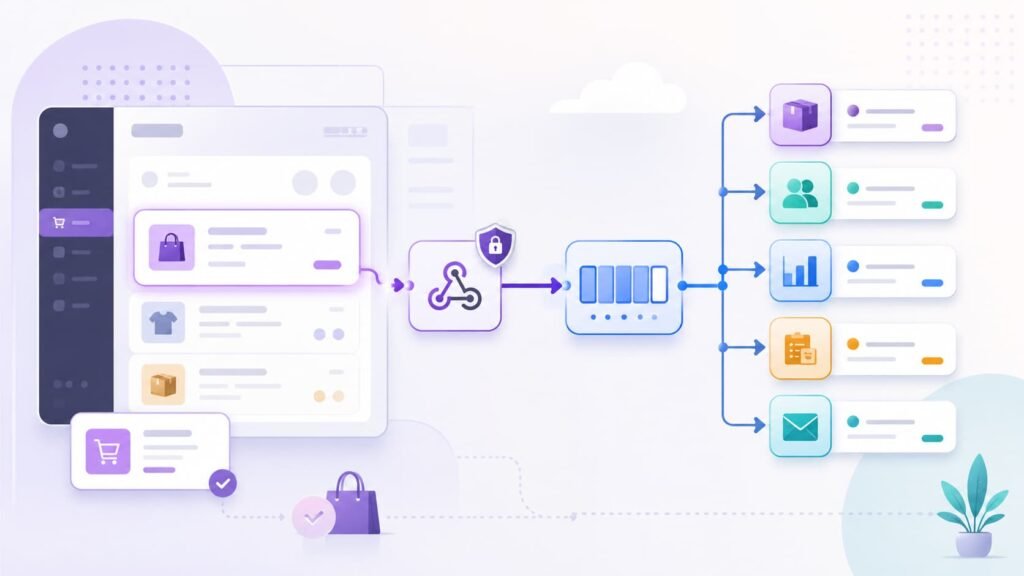
WooCommerce webhooks let your store notify another system when something important happens, such as an order being created, a product being updated, a coupon changing, or a customer record being modified. In 2026, the best way to use WooCommerce webhooks is not to bolt a store directly to a dozen external tools. It is to treat each webhook as an event signal, verify it, store it, process it through a queue, and then let purpose-built workflows handle fulfillment, CRM updates, inventory, analytics, or customer messaging.
That distinction matters. A basic webhook setup can work for a small store with one or two automations. A modern WooCommerce store usually has more moving parts: payment events, subscriptions, inventory systems, warehouse tools, email platforms, fraud checks, support desks, and reporting pipelines. If every webhook calls every destination directly, the system becomes fragile. One timeout can break an order workflow. One duplicate delivery can create two fulfillment tickets. One unverified endpoint can become a security risk.
This guide explains how WooCommerce webhooks work and how to design automation patterns that are reliable enough for modern ecommerce operations.
What WooCommerce webhooks do
A WooCommerce webhook is an automatic event notification sent from your store to a URL you choose. WooCommerce can trigger webhook deliveries for events connected to orders, products, coupons, customers, purchases, and custom actions. You can configure these in WooCommerce > Settings > Advanced > Webhooks.
The basic pieces are simple:
- Topic: The event that triggers the webhook, such as an order event or product event.
- Delivery URL: The endpoint that receives the payload.
- Secret: A shared secret used to generate a hash included in the request headers.
- Status: Active, paused, or disabled.
- Logs: Delivery records available through WooCommerce status logs.
WooCommerce also sends a ping the first time an active webhook is saved, which is useful for confirming that the receiving endpoint is reachable.
The simple version is: something happens in WooCommerce, WooCommerce sends a request, and your system reacts. The practical version is more nuanced. You need to decide what should happen if the endpoint is slow, if the request arrives twice, if the external API is down, or if order data changes again before the first automation finishes.
Why webhook architecture matters more in 2026
Webhook automation used to mean “send an order to another app.” That still happens, but modern WooCommerce automation is usually closer to event-driven operations.
A single order may need to trigger several workflows:
- Send fulfillment details to a warehouse.
- Update inventory in an ERP.
- Add or update the customer in a CRM.
- Send a transactional email or SMS.
- Start a post-purchase sequence.
- Push revenue data into analytics.
- Notify a support team if a rule is matched.
- Run a fraud or risk workflow.
Those workflows do not have the same urgency, failure tolerance, or data requirements. Fulfillment may need strict reliability. Analytics can often lag. A customer message may be time-sensitive but should not block order processing. A CRM update should not fail the whole automation chain.
The modern pattern is to decouple them. WooCommerce should emit the event. Your receiver should accept and record it quickly. Downstream workers should handle the heavier work.
WooCommerce webhook basics worth getting right
Before designing advanced flows, get the fundamentals right.
Choose the narrowest useful topic
Do not create broad webhook coverage just because it is available. If your workflow only cares when an order is created, use the narrow event that matches that need. If it needs to react to status changes, design for order updates and inspect the status transition.
Broad topics create unnecessary noise. Noise increases processing cost, makes debugging harder, and raises the chance that unrelated updates trigger downstream actions.
Keep delivery URLs stable
Your delivery URL should be treated like production infrastructure. Avoid temporary tunneling URLs, unstable serverless preview URLs, or endpoints tied to a developer’s local machine. For testing, use request inspection tools or a staging endpoint. For production, use a durable HTTPS endpoint with logging and alerting.
Use secrets and verify delivery
WooCommerce lets you set a webhook secret. That secret is used to generate a hash included in request headers. Your receiver should verify the request before processing the payload. Verification helps prevent random internet traffic from pretending to be your store.
At minimum, a webhook receiver should:
- Read the raw request body.
- Compute the expected HMAC using the shared secret.
- Compare it with the signature header using a timing-safe comparison.
- Reject the request if verification fails.
Do this before writing to your queue or database.
Know the failure behavior
WooCommerce automatically disables a webhook after more than five consecutive delivery failures. A failure is any response outside accepted success or redirect responses. In practice, your endpoint should return a successful 2xx response quickly after it has safely accepted the event.
Do not wait for a warehouse API, CRM API, or analytics API to finish before responding to WooCommerce. That turns every downstream outage into a webhook delivery failure.
Use logs as part of operations, not only debugging
WooCommerce stores webhook delivery logs under WooCommerce > Status > Logs, where you can filter for webhook delivery records. These logs are helpful when troubleshooting, but they should not be your only visibility layer.
For production automation, also log events in your receiver:
- Webhook ID or topic
- Store URL or store ID
- Resource ID, such as order ID
- Signature verification result
- Response returned to WooCommerce
- Queue job ID
- Downstream workflow status
When something fails, you need to know whether WooCommerce failed to deliver, your receiver rejected the request, the queue delayed the job, or the external destination rejected the update.
Pattern 1: Treat webhooks as event signals, not full data sync
The most reliable WooCommerce webhook pattern is to treat the webhook as a signal that something changed, not as the entire source of truth for all future processing.
For example, an order.updated style event tells you an order changed. Your system can record the event, then fetch the latest order data through the WooCommerce REST API before taking action. This is especially useful when several changes happen close together, such as payment completion, stock reduction, metadata updates, and fulfillment status changes.
This pattern has three benefits:
- Freshness: Workers can fetch the latest state before acting.
- Smaller assumptions: Your downstream code does not depend on every required field being present in the webhook body.
- Better recovery: If a job fails, it can retry using current WooCommerce data.
Do not overdo it. If the webhook payload contains enough information for a low-risk action, you do not need an API call every time. But for order fulfillment, financial workflows, inventory changes, and CRM data, enriching from the REST API usually gives you a safer workflow.
Pattern 2: Put a queue between WooCommerce and every external system
A webhook endpoint should be fast. Its job is to verify, record, and acknowledge. It should not run the whole business process inline.
A better architecture looks like this:
- WooCommerce sends the webhook.
- Your endpoint verifies the signature.
- Your endpoint stores the raw event and important metadata.
- Your endpoint returns a 2xx response.
- A queue worker processes the event.
- Downstream workflows run with retries and alerts.
This can be built with a dedicated queue service, a serverless queue, a database-backed job system, or WordPress-native tooling when the work belongs inside WordPress. Action Scheduler is especially relevant in the WooCommerce ecosystem because it is built for background processing in WordPress and is used for WooCommerce webhooks and other large task queues.
The key principle is the same no matter which queue you use: WooCommerce delivery should not depend on the uptime and speed of every downstream tool.
Pattern 3: Make every webhook idempotent
Idempotency means the same event can be processed more than once without causing duplicate side effects. Webhook systems need this because duplicate deliveries, retries, race conditions, and manual replays are normal parts of distributed systems.
For WooCommerce automation, idempotency often means storing a unique processing key before taking action. Depending on the workflow, that key might combine:
- Store ID or store URL
- Webhook ID
- Topic
- Resource ID, such as order ID
- Event timestamp
- Destination workflow name
For example, if an order-paid workflow creates a fulfillment request, store a record that says:
store_123 + order_9876 + fulfillment_create
If the webhook arrives again, your worker can see that fulfillment has already been created and skip the duplicate call.
Idempotency is not only about duplicate webhooks. It also protects you from humans clicking “retry,” queue jobs being replayed after a timeout, or external APIs returning unclear responses.
Pattern 4: Verify signatures before processing
Webhook endpoints are public URLs. Anyone can send requests to them. That does not mean every request should be trusted.
Use the WooCommerce webhook secret to verify each request. Store secrets outside your codebase, rotate them when needed, and keep separate secrets for production and staging.
A practical verification policy should include:
- Reject requests with missing signature headers.
- Reject requests where the computed signature does not match.
- Reject unsupported HTTP methods.
- Apply reasonable body size limits.
- Log verification failures without storing sensitive payloads unnecessarily.
- Return a generic error response so attackers do not learn too much.
For high-value workflows, add more controls: IP reputation checks, rate limiting, replay protection, and per-store secrets if your endpoint receives webhooks from multiple WooCommerce stores.
Pattern 5: Design around retries, failures, and disabled webhooks
Failures are not edge cases. They are part of the design.
Your receiver should return a 2xx response only after it has safely accepted the event. That usually means the event has been verified and written to durable storage or a queue. If the receiver cannot store the event, returning a non-2xx response is reasonable because WooCommerce should know delivery failed.
Downstream failures should be handled after acknowledgement:
- Retry temporary API errors with backoff.
- Stop retrying permanent validation errors.
- Move repeated failures to a dead-letter queue.
- Alert a human when important workflows stop.
- Provide a replay tool for fixed failures.
Also monitor WooCommerce itself. Since WooCommerce can disable a webhook after repeated delivery failures, production teams should check webhook status and delivery logs. A disabled webhook can silently break order operations if nobody owns monitoring.
Pattern 6: Build HPOS-aware order automations
High-Performance Order Storage, or HPOS, changed how WooCommerce stores order data. WooCommerce introduced dedicated order tables to improve scalability, reliability, and simplicity, and HPOS has been enabled by default for new installations since WooCommerce 8.2.
For webhook automation, the lesson is straightforward: do not build order workflows that assume orders live only in WordPress posts and postmeta tables. Use WooCommerce CRUD methods, supported APIs, and HPOS-compatible extensions.
This matters when a webhook triggers custom WordPress code. If that code reads directly from _posts or _postmeta, it may work on older stores and fail or behave inconsistently on HPOS stores. If your automation fetches order data through the WooCommerce REST API or WooCommerce CRUD layer, it is better aligned with current WooCommerce architecture.
HPOS also reinforces the broader point: webhook automation should rely on stable contracts, not implementation details.
Pattern 7: Separate operational automations from customer-facing automations
Not every webhook workflow should be treated the same.
Operational automations need accuracy and recovery. Examples include fulfillment, inventory, accounting, tax, fraud review, and ERP updates. These workflows should use strict idempotency, durable queues, alerting, and replay tools.
Customer-facing automations need timing and message control. Examples include post-purchase emails, SMS notifications, review requests, and loyalty updates. These workflows should respect consent, avoid duplicates, and include suppression rules. A duplicate fulfillment request is an operations problem. A duplicate customer message is a trust problem.
Analytics automations need completeness and consistency. They can often tolerate delay, but they should preserve event order where needed and avoid dropping events silently.
A mature WooCommerce setup does not send the same raw webhook to every destination and hope each tool behaves. It routes events into different workflows based on business impact.
WooCommerce webhook examples by use case
| Use case | Trigger idea | Recommended pattern |
|---|---|---|
| Send paid orders to fulfillment | Order created or order updated after payment | Verify, queue, fetch latest order, create fulfillment idempotently |
| Sync products to an external catalog | Product created, updated, or deleted | Batch updates through a queue and collapse repeated product changes |
| Add buyers to CRM | Order created or customer updated | Queue event, normalize customer identity, upsert rather than create |
| Update inventory system | Order paid, refunded, canceled, or product updated | Use strict idempotency and reconcile inventory periodically |
| Trigger post-purchase emails | Order status reaches processing or completed | Check consent and suppression rules before sending |
| Push revenue events to analytics | Order paid, refunded, subscription event | Store raw events and replay if analytics API is unavailable |
| Notify support of risky orders | Order created or payment completed | Apply rules in a worker and create one support ticket per order |
The common pattern is not complicated: accept the event, protect the system from duplicates, enrich only when needed, then route the work to the right destination.
Common mistakes to avoid
Calling external APIs before responding to WooCommerce
This is the most common reliability mistake. If your endpoint waits for three external APIs before returning a response, any one of those services can cause WooCommerce delivery failures. Accept first, process later.
Treating every order update as a business event
An order can be updated for many reasons. Metadata changes, status transitions, admin edits, payment updates, and plugin actions can all modify an order. Your workflow should inspect what changed instead of assuming every update means the same thing.
Ignoring duplicate events
If your automation cannot handle duplicate delivery, it is not production-ready. Add idempotency before connecting fulfillment, accounting, or customer messaging.
Skipping signature verification
A public endpoint without verification is an unnecessary risk. Even if the workflow seems harmless today, webhook endpoints often gain more responsibilities over time.
Depending on postmeta for order data
With HPOS now part of modern WooCommerce architecture, direct post table assumptions are brittle. Use supported WooCommerce data access patterns.
Not monitoring disabled webhooks
WooCommerce can disable webhooks after repeated failures. If no one checks status or logs, an automation can be broken while the store keeps taking orders.
Modern WooCommerce webhook checklist
Use this checklist before shipping a WooCommerce webhook automation:
- The webhook topic is as narrow as practical.
- The delivery URL uses HTTPS and stable production infrastructure.
- The receiver verifies the WooCommerce signature.
- The endpoint stores the raw event or essential event metadata.
- The endpoint returns 2xx quickly after safe acceptance.
- Downstream work runs in a queue.
- Each workflow has an idempotency key.
- External API failures retry with backoff.
- Permanent failures move to a reviewable error state.
- Important events can be replayed.
- Webhook delivery logs and receiver logs are both available.
- Alerts exist for disabled webhooks, queue backlog, and repeated failures.
- Order workflows use WooCommerce APIs or CRUD methods rather than direct post table assumptions.
- Staging and production use separate secrets and endpoints.
FAQ
WooCommerce webhooks are automatic event notifications sent from a WooCommerce store to a URL you choose. They are commonly used to trigger workflows when orders, products, coupons, customers, purchases, or custom actions change.
WooCommerce webhooks are event-driven and usually delivered quickly, but they should not be treated as a guaranteed real-time processing system. For production workflows, accept the webhook quickly, process it through a queue, and monitor failures or delays.
No. Webhooks and the WooCommerce REST API solve different problems. Webhooks notify your system that something happened. The REST API is useful when your system needs to fetch the latest state, enrich the event, or update WooCommerce data.
Return a 2xx status after the event has been verified and safely accepted into durable storage or a queue. Avoid waiting for downstream systems before responding to WooCommerce.
Set a webhook secret, verify the signature on every request, use HTTPS, reject unsupported methods, apply body size limits, separate staging and production secrets, and monitor failed verification attempts.
WooCommerce can automatically disable a webhook after more than five consecutive delivery failures. Production teams should monitor webhook status, delivery logs, queue health, and receiver errors so failures are caught quickly.
Webhooks can still trigger order automations, but custom code should avoid assuming orders are stored only in WordPress posts and postmeta. Use WooCommerce CRUD methods or supported APIs so automation stays compatible with High-Performance Order Storage.
Final thoughts
WooCommerce webhooks are simple to create, but reliable automation takes more than a delivery URL. In 2026, the strongest pattern is event-driven: verify the request, store the event, acknowledge quickly, process through queues, make each workflow idempotent, and use supported WooCommerce APIs for order data.
That architecture keeps the store responsive while giving operations teams the reliability they need. Webhooks should start the workflow. They should not be the fragile thread holding the whole ecommerce stack together.