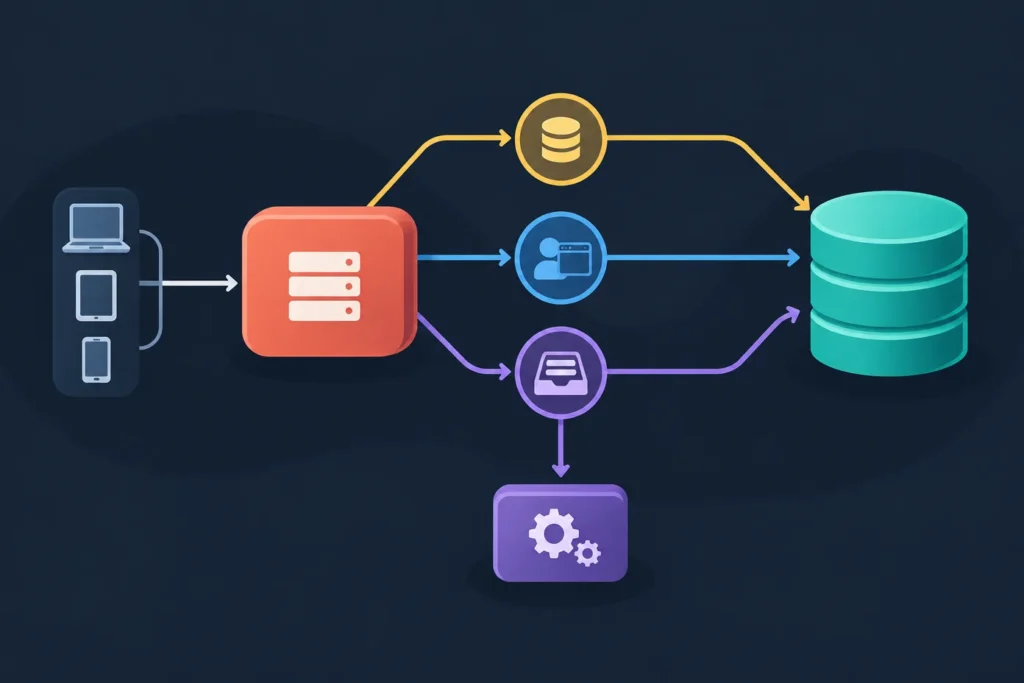
Laravel can use Redis as the backend for application cache, browser sessions, and queued jobs. The core work is to make the Redis server reachable, configure Laravel’s Redis connection, select Redis for each service, and clear cached configuration before testing each feature independently.
Version assumption: Laravel configuration names and defaults can differ between releases, and Redis support also depends on your PHP version, Redis server, and selected Redis client. Treat the examples below as a working pattern, then compare them with the config/database.php, config/cache.php, config/session.php, and config/queue.php files in your installed application.
Quick setup overview
For a typical local Redis server, start with this environment-variable pattern:
REDIS_CLIENT=phpredis
REDIS_HOST=127.0.0.1
REDIS_PORT=6379
REDIS_USERNAME=null
REDIS_PASSWORD=null
REDIS_DB=0
REDIS_CACHE_DB=1

CACHE_STORE=redis
SESSION_DRIVER=redis
SESSION_CONNECTION=default
QUEUE_CONNECTION=redis
REDIS_QUEUE=default
If your Laravel version uses CACHE_DRIVER rather than CACHE_STORE, set CACHE_DRIVER=redis instead. Do not set both unless your application’s configuration explicitly reads both; the variable that matters is the one referenced in config/cache.php.
This example uses database index 0 for the default Redis connection and index 1 for cache. Sessions and queues can initially use the default connection. Separating them later with named connections or additional database indexes can make key inspection and operational isolation easier, but it is not a requirement for a first setup.
- Confirm Redis replies to a basic
PING. - Set the Redis connection values in
.env. - Set the cache store, session driver, and queue connection to Redis.
- Run
php artisan config:clearafter environment changes. - Test a cache value, a browser session, and a dispatched job separately.
- Start a queue worker before expecting queued jobs to run.
Requirements and environment choices
Before changing Laravel settings, identify the environment in which the application and Redis server run. Record your Laravel version, PHP version, Redis server version, Redis client choice, application hostname, and whether Redis is local, containerized, or managed. This small checklist prevents many “works on my machine” configuration problems.
What Laravel needs
- A Laravel application with Redis connection settings available in
config/database.php. - A reachable Redis server.
- A supported PHP Redis client. Laravel applications commonly use the PHP Redis extension through
phpredisor the Composer packagepredis/predisthroughpredis. - A queue worker process when Redis is used for asynchronous jobs.
Choose the client that your project and deployment support. With phpredis, the PHP extension must be installed and enabled for the same PHP runtime that serves Laravel and runs Artisan commands. With Predis, the project needs the matching Composer dependency. A client mismatch commonly appears as a class, extension, or connection-option error.
Choose the correct host for the application
| Environment | Typical Redis host Laravel should use | Important detail |
|---|---|---|
| Laravel and Redis installed on the same machine | 127.0.0.1 or localhost | Use the port on which the local Redis service listens. |
| Laravel in Docker Compose with Redis as another service | The Compose service name, often redis | Containers communicate over the Docker network using the service’s internal port, usually 6379. |
| Laravel on the host, Redis in Docker | 127.0.0.1 | Use the published host port, which may not be 6379. |
| Managed Redis service | The provider endpoint | Use the supplied port, credentials, and TLS settings; do not expose or commit them. |
For example, a Compose service might publish 6380:6379. A Laravel container should still generally use REDIS_HOST=redis and REDIS_PORT=6379. A Laravel process running on your host machine would use REDIS_HOST=127.0.0.1 and REDIS_PORT=6380. Mixing up the host-facing port with the container-facing port is a frequent cause of connection failures.
Keep production passwords and endpoints in deployment secrets or the hosting platform’s environment configuration. Do not commit a production .env file or paste credentials into logs, screenshots, or support requests.
Install or connect to Redis
This guide focuses on Laravel rather than Redis administration. The immediate goal is simply to verify that a Redis server is running and reachable from the same place where Laravel executes.
When the Redis command-line client is available, run:
redis-cli pingA reachable server normally returns:
PONGFor a password-protected instance, use the connection method appropriate to your environment rather than placing a password in shell history. If Redis runs in a container, you can run the client inside that container, for example:
docker compose exec redis redis-cli pingThe service name in that command must match your Compose file. If Laravel runs in its own container, test connectivity from the Laravel container too. A host can reach a published Redis port while the application container cannot resolve the host, or the reverse can be true.
A minimal Compose-style Redis service often resembles this:
services:
  redis:
    image: redis
    ports:
      - "6379:6379"
This is only a local-development illustration. Production Redis configuration should account for persistence requirements, authentication, network boundaries, encryption requirements, monitoring, and service-specific operational controls.
Configure Laravel Redis connections
Laravel’s Redis connection definitions normally live in config/database.php. Many applications provide a default connection and a cache connection, with values populated from .env. Inspect your file before adding custom options because Laravel versions and project templates may structure this section differently.
A practical .env configuration for local development is:
REDIS_CLIENT=phpredis
REDIS_HOST=127.0.0.1
REDIS_PORT=6379
REDIS_USERNAME=null
REDIS_PASSWORD=null
REDIS_DB=0
REDIS_CACHE_DB=1

CACHE_STORE=redis
SESSION_DRIVER=redis
SESSION_CONNECTION=default
QUEUE_CONNECTION=redis
REDIS_QUEUE=default
Use actual values only where your service requires them. In particular, an ACL-enabled Redis installation may require both a username and password. Some installations only use a password. Managed services may provide a URL or require TLS-related options. Follow the structure already supported by your installed Laravel configuration and Redis client instead of assuming every option is interchangeable.
Connections, database indexes, and prefixes
A Redis database index is a logical namespace within a Redis server, not the same thing as a relational database. Using one index for general application data and another for cache can reduce accidental key overlap. Named Laravel connections can be even clearer when sessions or queues need their own settings.
Prefixes are another important layer. Laravel prefixes keys so that applications sharing a Redis server are less likely to collide. Give each environment a distinct application prefix. For example, production and staging should not use an identical prefix against the same Redis instance. Avoid manually deleting keys unless you understand the prefix and impact of the command.
When your Redis provider requires encrypted transport, configure the connection using the TLS-capable structure supported by your installed Laravel version and selected client. A plain local Redis example should not be copied unchanged into a provider environment that requires TLS.
Clear configuration cache after changes
Laravel may use already-cached configuration rather than rereading .env. After changing environment values, run:
php artisan config:clear
php artisan cache:clear
In a deployment workflow, rebuild configuration caching only after the correct production environment values are available:
php artisan config:cacheRestart long-running processes afterward. Queue workers do not automatically adopt every configuration change while they remain alive.
Use Redis for application cache
Set Laravel’s cache store to Redis using the variable read by your application’s cache configuration:
CACHE_STORE=redisOlder application structures may instead read:
CACHE_DRIVER=redisVerify the configured default in config/cache.php; this is more reliable than copying a variable name from a tutorial written for another Laravel release.
Use a short cache write/read test in Tinker:
php artisan tinker

use Illuminate\Support\Facades\Cache;

Cache::put('redis-setup-check', 'stored-in-redis', now()->addMinutes(5));
Cache::get('redis-setup-check');
The final expression should return stored-in-redis. You can also remove the key after testing:
Cache::forget('redis-setup-check');For a server-side check, inspect keys cautiously and only in a safe environment. The actual key commonly includes Laravel’s configured prefix, so it will not necessarily be the literal string you wrote. Do not use broad destructive commands such as flushing an entire production Redis database just to verify a cache test.
Redis cache is appropriate for data that can be recomputed or refetched when it expires or is evicted. It is not a replacement for durable application records that belong in a database or another persistence system designed for that purpose.
Use Redis for sessions
Redis-backed sessions let multiple application instances read the same session data. That matters when requests from one browser can be handled by different PHP application servers. Configure the session driver:
SESSION_DRIVER=redis
SESSION_CONNECTION=default
Confirm the exact session connection variable in config/session.php. Some project configurations may use a different name or leave it null so Laravel uses a default Redis connection. If you define a dedicated session connection, point the session configuration to that named connection.
Session storage is only one part of session behavior. Browser cookies must also be valid for the URL being tested. Check the application URL, cookie domain, secure-cookie setting, SameSite policy, and session lifetime. A secure cookie will not be sent over an ordinary HTTP local URL, while an incorrect domain can make a perfectly healthy Redis session look as though it disappears on every request.
A simple test route in the web middleware group can write and read a value:
use Illuminate\Support\Facades\Route;

Route::get('/session-redis-check', function () {
    session(['redis_setup_check' => 'ok']);

    return session('redis_setup_check');
});
Visit the route twice in the same browser. It should return ok and preserve the session cookie. Remove the route after testing. For a realistic application test, sign in through the normal login flow, make another request, and confirm that the authenticated session remains available.
If sessions appear to reset, first clear cached configuration and verify the browser has the expected session cookie. Then check that Laravel can reach the Redis connection, that the session connection name exists, and that multiple application instances share the same Redis target and compatible cookie settings.
Use Redis for queues
Select Redis as the default queue connection:
QUEUE_CONNECTION=redis
REDIS_QUEUE=default
The queue connection definition is normally in config/queue.php. It may use the default Redis connection, a configured queue name, retry timing, block timing, and a prefix. If multiple applications share Redis, use distinct prefixes and, where appropriate, distinct queue names or connections so one application does not consume another application’s jobs.
Create a small verification job:
php artisan make:job RedisSetupCheckThen make the job log a message from its handle method:
use Illuminate\Support\Facades\Log;

public function handle(): void
{
    Log::info('Redis queue setup check processed');
}
Dispatch it from a route, controller, or Tinker:
php artisan tinker

App\Jobs\RedisSetupCheck::dispatch();
In another terminal, start a worker:
php artisan queue:work redis --queue=defaultA successfully processed job produces the expected log message. If the job is dispatched but nothing happens, the usual missing piece is the worker process. In production, workers need process supervision or an equivalent deployment mechanism so they are started, monitored, and restarted with new code and configuration.
This article keeps worker operations focused on Redis connection setup. For job design, retries, failed jobs, and worker management, continue with Laravel 13 Queues: Setup, Workers, Retries, and Practical Job Examples.
Verify the complete setup
Test each Redis-backed service independently. A successful cache test does not prove sessions are using the intended connection, and a reachable Redis server does not prove a queue worker is running.
- Run
php artisan config:clear, then restart relevant PHP and worker processes. - Run the cache
putandgettest in Tinker. - Visit a temporary session test route twice, or validate a normal authenticated session.
- Dispatch the verification job and run
php artisan queue:work redis --queue=default. - Check the application log for the job’s message.
If only one test fails, focus on that layer: cache-store selection for cache, cookies and session configuration for sessions, or worker and queue-name configuration for jobs. If all three fail with a connection error, start with host, port, authentication, network access, and configuration caching.
Troubleshooting and production considerations
| Symptom | Likely cause | Practical fix |
|---|---|---|
| Connection refused | Redis is stopped, the host/port is wrong, or the port is not exposed. | Run a Redis PING from the same host or container as Laravel. Verify Compose service names and published ports. |
| Hostname cannot be resolved | REDIS_HOST uses a Docker service name outside Docker, or an invalid DNS name. | Use the Compose service name only from containers on that network. Use the reachable host address from the environment running Laravel. |
| Authentication failure | Password, ACL username, or authentication mode is incorrect. | Compare the supplied Redis credentials with the connection settings. Do not expose secrets while debugging. |
| Timeout | Network rules, incorrect endpoint, TLS mismatch, or an unavailable service. | Check network access, endpoint, port, and whether the service requires TLS. Use configuration supported by the installed client. |
| Laravel keeps using old values | Configuration is cached or a worker is still running with old configuration. | Run php artisan config:clear, rebuild config only when appropriate, and restart workers and application processes. |
| Cache works but sessions reset | Cookie domain, HTTPS, session connection, or load-balanced application settings are wrong. | Inspect browser cookies and config/session.php. Ensure every application instance uses the same session backend and compatible cookie settings. |
| Jobs remain pending | No worker is running, the worker listens to another queue, or it has old settings. | Start a worker for the Redis connection and intended queue; restart supervised workers after deployment. |
| Class or extension error | The selected Redis client is not installed for the PHP runtime. | Install/enable the required PHP extension or Composer package, then ensure REDIS_CLIENT matches it. |
For production, Redis should not be publicly reachable without deliberate protection. Restrict network access to application hosts, use credentials, use encrypted transport when the infrastructure requires it, and keep endpoints and passwords in managed environment configuration. Use separate prefixes for environments, avoid casual destructive Redis commands, and decide deliberately which data can safely expire or be recreated.
Also plan restarts: clear or rebuild Laravel configuration during deployment, then restart queue workers so they load the release’s code and environment. Test cache, session, and queue behavior after a deployment rather than assuming a successful application boot confirms all three services.
Next step
Once cache reads, session persistence, and the verification job all work, bookmark this setup pattern for future environments. Then use the Laravel queues guide for workers, retries, failed jobs, and practical job examples to turn the Redis connection into a reliable background-job workflow.