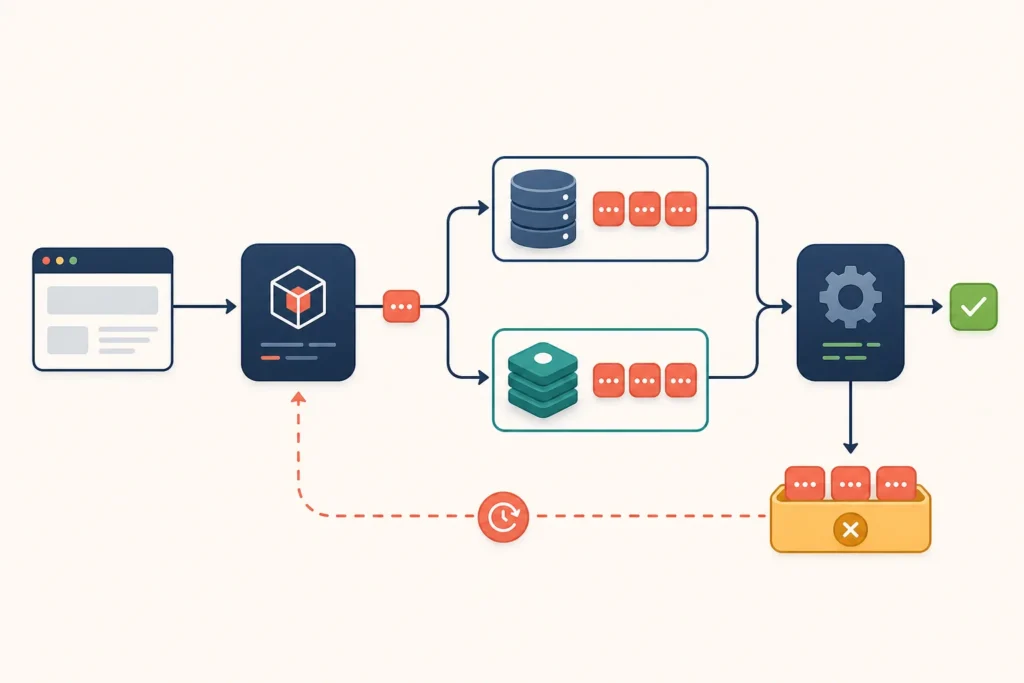
Laravel queues move slow or non-essential work out of the web request. A typical flow is: your controller dispatches a job, Laravel stores it in the configured queue connection, and a worker runs the job separately. This guide uses a database queue as the shortest working path, then shows the Redis alternative.
The examples target Laravel 13. Queue commands and default configuration can change between framework releases, so confirm version-specific details against the official Laravel documentation before using the examples in a production deployment.
Laravel 13 queue setup at a glance
For a basic database-backed queue, the working path is:
- Create Laravel’s queue table migration and run migrations.
- Set
QUEUE_CONNECTION=databasein.env. - Create a job that implements
ShouldQueue. - Dispatch the job from application code.
- Run
php artisan queue:workin a separate terminal.
Use the database driver when you want a straightforward setup using an existing relational database. Use Redis when Redis is already part of your application environment or you want queue storage separated from the application database. Both still require a worker: selecting a queue connection only determines where pending jobs are stored.
Requirements and environment configuration
Prepare a Laravel 13 application with a supported PHP version for that release, a configured database connection, and command-line access to Artisan. For the Redis route, you also need an accessible Redis server and a supported PHP Redis client or extension configured by your application.
These environment values are the important starting point for a database queue:
APP_ENV=local
QUEUE_CONNECTION=database

DB_CONNECTION=mysql
DB_HOST=127.0.0.1
DB_PORT=3306
DB_DATABASE=example_app
DB_USERNAME=example_user
DB_PASSWORD=example_password
Replace the database placeholders with your own values. In local development, keep the worker in a separate terminal so you can see exceptions as they happen. In production, workers should be managed by a service or process manager rather than an interactive terminal session.
A special case is QUEUE_CONNECTION=sync. With the sync connection, Laravel executes the job during the current request instead of placing it in a queue. This can make development simpler, but it does not test queue storage, worker execution, retry behavior, or operational failures.
If configuration is cached, changes to .env may not take effect until you rebuild or clear the relevant cache. Make configuration changes deliberately during deployment, then restart workers so they load the new application state.
Configure the database queue driver
The database driver is a practical starting point when your application already has a database and you do not want to provision Redis first. Laravel stores pending jobs in a jobs table. It can also record exhausted jobs in a failed-jobs table.
Generate the required migrations:
php artisan make:queue-table
php artisan make:queue-failed-table
php artisan migrate
Review generated migrations before running them in a shared environment, particularly if your project has custom migration conventions. The queue migration creates the storage required for pending jobs, while the failed-job migration creates storage for jobs that exceed their allowed attempts or otherwise fail permanently.
Then set the connection:
QUEUE_CONNECTION=database
QUEUE_FAILED_DRIVER=database-uuids
The exact failed-job driver default can depend on the application configuration created for your Laravel version. The important part is that the configured failed-job driver and its migration agree. If your project uses a different value in config/queue.php, preserve that convention instead of copying a conflicting setting.
After configuration is loaded, dispatching a queued job should create a row in jobs until a worker reserves and processes it. Do not manually edit serialized job payloads in the database; use Artisan commands to retry or remove failed jobs.
Configure Redis queues as an alternative
With Redis queues, Laravel writes job payloads to Redis while one or more queue workers consume them. Your application must be able to connect to the same Redis instance as the workers.
Review the Redis variables used by your application’s Redis configuration:
QUEUE_CONNECTION=redis

REDIS_CLIENT=phpredis
REDIS_HOST=127.0.0.1
REDIS_PASSWORD=null
REDIS_PORT=6379
The appropriate value for REDIS_CLIENT depends on the client installed in your project. Many applications use the PHP Redis extension; others use a PHP client package. Check config/database.php and the installed dependencies rather than assuming a client is available.
For Docker-based local development, make sure the Laravel container and worker container can resolve the Redis service hostname defined by your Compose configuration. A hostname such as redis is common when the service has that name, but it is only an example; use the actual host available on your network. Start Redis before dispatching jobs, then clear or rebuild configuration cache if your environment values changed.
Redis and database queues solve the same basic workflow but have different operational dependencies. Choose the option your team can configure, observe, back up, and operate reliably. Avoid changing drivers solely on the assumption that one is always better; the right choice depends on the application’s existing services and deployment model.
Create and dispatch a Laravel job
Create a job class:
php artisan make:job ProcessOrderHere is an example job that receives an order ID, loads the order when the worker runs, and performs a placeholder background action. Loading the model inside handle() avoids putting unnecessary state into the queued payload.
<?php

namespace App\Jobs;

use App\Models\Order;
use Illuminate\Bus\Queueable;
use Illuminate\Contracts\Queue\ShouldQueue;
use Illuminate\Foundation\Bus\Dispatchable;
use Illuminate\Queue\InteractsWithQueue;
use Illuminate\Queue\SerializesModels;
use Throwable;

class ProcessOrder implements ShouldQueue
{
    use Dispatchable, InteractsWithQueue, Queueable, SerializesModels;

    public int $tries = 3;
    public int $timeout = 120;
    public array $backoff = [10, 30, 60];

    public function __construct(public int $orderId)
    {
    }

    public function handle(): void
    {
        $order = Order::findOrFail($this->orderId);

        // Example: generate a document, notify another service,
        // or perform another task that should not delay the request.
        $order->update(['processing_started_at' => now()]);
    }

    public function failed(Throwable $exception): void
    {
        // Example: record a domain-specific failure or notify the team.
        // Do not rethrow here; Laravel has already marked the job as failed.
    }
}
Dispatch it after an order is created:
use App\Jobs\ProcessOrder;

ProcessOrder::dispatch($order->id);
If the job depends on data written in a database transaction, dispatch it only after that transaction commits. For example:
DB::transaction(function () use (&$order) {
    $order = Order::create($validated);

    ProcessOrder::dispatch($order->id)->afterCommit();
});
Without afterCommit(), a fast worker could run before the transaction is committed and fail to find the expected record. Use immediate dispatch only when the job does not rely on uncommitted data.
Run workers and verify job execution
Start a worker with:
php artisan queue:workFor a more explicit local command:
php artisan queue:work database --queue=default --tries=3 --timeout=120The first argument selects the connection. The --queue option limits the worker to named queues, --tries sets a worker-level attempt limit, and --timeout limits how long an individual job may run. Job-level properties can also define these settings; establish one clear project convention to avoid surprises.
For a finite local test, add --once to process one available job, or use --max-jobs=1 to let the worker exit after one job. Do not confuse a successful dispatch with successful processing: dispatch only confirms that Laravel accepted the job.
Verification checklist
- Confirm
QUEUE_CONNECTIONis notsyncwhen testing asynchronous work. - Dispatch the job and confirm a database row or Redis queue entry is created.
- Run a worker using the same connection and queue name.
- Check the worker output for an exception.
- Confirm the intended side effect, such as the example order timestamp update.
- Check failed-job storage if the job does not complete.
Retries, timeouts, and failed jobs
Retries handle failures that may be temporary, such as a short-lived network error. In the example, Laravel can attempt the job up to three times and wait 10, 30, then 60 seconds before later attempts. Design the job so repeated execution is safe: for example, avoid sending duplicate notifications or charging twice when a previous attempt may have completed part of the work.
Timeouts protect workers from jobs that do not finish. Set the job timeout high enough for legitimate work but low enough that a stuck process is not held forever. Also ensure the worker timeout is compatible with the job timeout. Long-running imports, media conversions, or external API calls may need a purpose-built design rather than simply increasing every timeout.
Inspect failed jobs with:
php artisan queue:failedRetry a specific failed job using its displayed identifier:
php artisan queue:retry <id>Remove a failed-job record only after you understand it or intentionally no longer need it:
php artisan queue:forget <id>A retry is appropriate for a recoverable condition. Repeated validation errors, missing application data, incompatible code changes, and permission problems are application bugs or configuration issues; fix the underlying cause before repeatedly retrying them.
Scheduling, deployment, and worker operations
Dispatching and scheduling are separate concerns. Dispatching adds work now. Scheduling decides when a command or callback should add work. For example, a scheduled callback can enqueue a daily maintenance job:
use App\Jobs\ProcessDailyOrders;
use Illuminate\Support\Facades\Schedule;

Schedule::call(function () {
    ProcessDailyOrders::dispatch();
})->daily();
Place schedule definitions in the location used by your Laravel 13 application, commonly the console routes file in newer Laravel application structures. The scheduler also needs its own production trigger, while queue workers need persistent supervision. One does not replace the other.
Run workers under a suitable process manager or container orchestration strategy. During deployment, restart workers after new code is released:
php artisan queue:restartBefore release, verify environment values, database migrations, Redis reachability if used, failed-job storage, worker command arguments, and permissions for every service the job touches.
Troubleshooting and practical next steps
If jobs remain pending, start with the simplest checks:
- No worker is running: run
php artisan queue:workusing the correct connection. - Wrong connection: compare
QUEUE_CONNECTION, cached configuration, and the worker command. - Wrong queue name: a job sent to a named queue needs a worker listening to that queue.
- Database setup is incomplete: confirm the queue migrations ran against the database configured by the application.
- Redis is unavailable: verify the host, port, credentials, network access, and selected Redis client.
- Jobs disappear or repeatedly fail: inspect worker output and
php artisan queue:failed. - No failed-job records exist: confirm the failed-job driver and corresponding migration are configured.
For an end-to-end test, set the database driver, migrate the queue tables, dispatch a job that makes one observable update, run one worker, and inspect failed jobs if the update never occurs. Once that path works, move the worker into your deployment process and add monitoring appropriate to your environment.
Bookmark this reference when building additional jobs, then continue with your project’s Redis, Docker, deployment, or Laravel troubleshooting documentation for environment-specific worker operations.