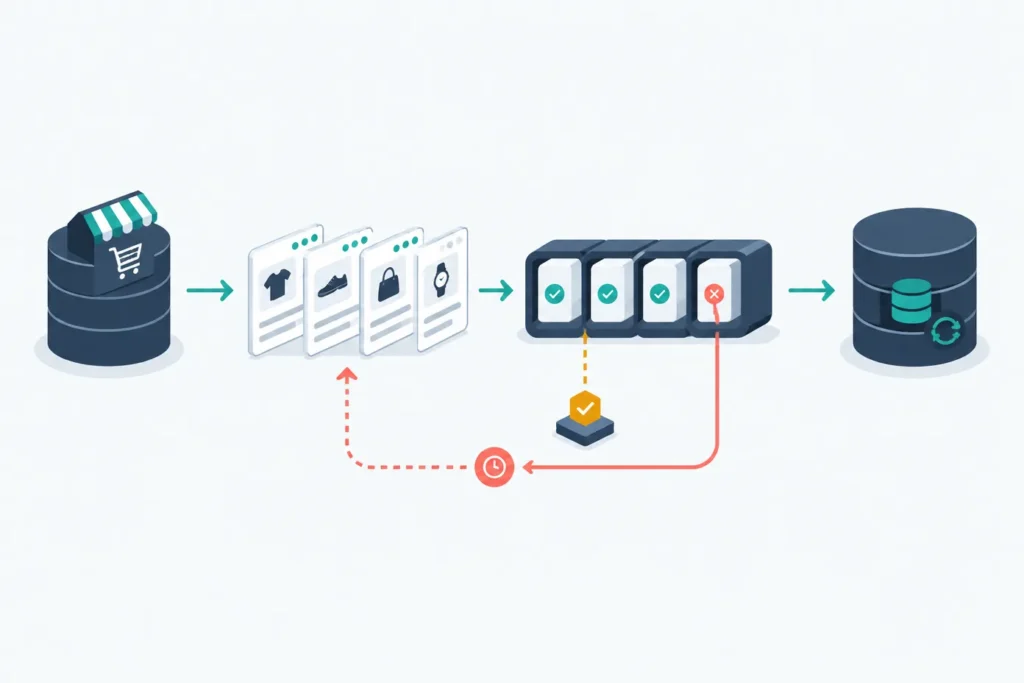
WooCommerce collection endpoints are normally retrieved in pages, not as one unlimited response. A reliable integration requests a bounded page, validates the response, processes that page immediately, saves a checkpoint, and then advances to the next page. When available, response metadata tells the client how many records and pages exist; an empty-page check provides a useful fallback.
There is no single WooCommerce REST API rate limit that can be assumed for every store. Practical capacity depends on the site’s hosting, PHP and database resources, web server or proxy settings, security tooling, and the work required to build each response. Treat pagination, retry logic, and measured concurrency as part of the integration design.
Quick answer: how WooCommerce REST API retrieval works
For a collection such as products or orders, use a request shaped like this:
GET /wp-json/wc/v3/products?page=1&per_page=50&orderby=id&order=ascpageselects the page number, starting at 1.per_pageasks for a bounded number of records in that response.orderbyandorderrequest a predictable sequence where the endpoint supports them.
The usual retrieval cycle is:
- Request a page with an explicit, reasonable page size.
- Confirm that the response is successful and that its body is an array.
- Read
X-WP-TotalandX-WP-TotalPagesif they are present. - Write or enqueue each record rather than accumulating the entire collection in memory.
- Durably record the last completed page or cursor-like checkpoint.
- Continue until the reported final page or an empty response indicates there is no more data.
This is suitable for one-time exports and can also be the baseline for a scheduled reconciliation job. For ongoing synchronization, combine it with a stable checkpoint, filters supported by the target endpoint, and optionally event-driven updates.
Requirements and version considerations
This article uses the common WooCommerce REST route convention /wp-json/wc/v3/ and JavaScript’s built-in fetch API. It deliberately does not claim a specific WordPress or WooCommerce release: route availability, accepted query parameters, permissions, and response fields must be verified against the versions installed on the target store.
Before diagnosing pagination, make sure authentication and permissions are correct. A request that returns 401 or 403 is not a pagination failure. The general concepts in this WordPress REST API authentication guide can help clarify credentials, authenticated requests, and permission troubleshooting.
Test a representative request on a staging store before running a large export. Check the endpoint, API key permissions, expected order fields, and whether a proxy or security layer changes response headers. Also test with realistic data volume where possible; a request that works against a small catalog may expose different timeout or resource behavior on a busy store.
REST API pagination is a pull mechanism: your application asks for a collection repeatedly. Webhooks are push notifications about events. They solve different parts of a synchronization problem. A webhook can reduce the need to repeatedly scan every order, but it should not be treated as an automatic replacement for reconciliation or durable processing.
Pagination parameters and response metadata
page and per_page are query parameters on collection requests. For example, this requests the third page of orders, up to 25 records per page:
GET /wp-json/wc/v3/orders?page=3&per_page=25&orderby=id&order=ascUse an explicit page size rather than relying on a default. A smaller page produces less work and a smaller response per request, which can help when a store has large product objects, extensive metadata, or slow infrastructure. The trade-off is more HTTP requests. A larger page reduces request count but can increase memory use, response time, and timeout risk. Start conservatively, observe behavior in a controlled environment, then adjust.
WordPress REST responses commonly provide these headers for paginated collections:
X-WP-Total: total matching records.X-WP-TotalPages: number of pages for the current filter and page size.
For a response with X-WP-TotalPages: 12, process pages 1 through 12. Do not assume these headers will always arrive. A reverse proxy, custom endpoint, caching layer, or intermediary may omit or alter them. An integration should therefore use metadata when it is available and stop safely on an empty page as a fallback.
Data can change while a long export runs. New records may move the apparent final page, while edits can change the order of records if the chosen sort field is mutable. Explicit ordering reduces ambiguity but does not make a changing dataset static. For important data movement, use a durable checkpoint strategy and reconcile after the initial run.
A reliable pagination loop with code
The following JavaScript example retrieves products one page at a time. It is intentionally adaptable: replace the placeholder persistence functions with a database write, queue publish, file stream, or another durable operation.
const baseUrl = process.env.WC_BASE_URL; // e.g. https://store.example
const consumerKey = process.env.WC_CONSUMER_KEY;
const consumerSecret = process.env.WC_CONSUMER_SECRET;

const perPage = 50;
const maxAttempts = 4;

function sleep(milliseconds) {
  return new Promise((resolve) => setTimeout(resolve, milliseconds));
}

function retryDelayMs(attempt, retryAfter) {
  if (retryAfter && /^\d+$/.test(retryAfter)) {
    return Number(retryAfter) * 1000;
  }

  const exponential = 500 * (2 ** (attempt - 1));
  const jitter = Math.floor(Math.random() * 250);
  return exponential + jitter;
}

function isTransientStatus(status) {
  return status === 408 || status === 429 || status >= 500;
}

async function fetchPage(page) {
  const url = new URL('/wp-json/wc/v3/products', baseUrl);
  url.searchParams.set('page', String(page));
  url.searchParams.set('per_page', String(perPage));
  url.searchParams.set('orderby', 'id');
  url.searchParams.set('order', 'asc');

  for (let attempt = 1; attempt <= maxAttempts; attempt += 1) {
    try {
      const basicToken = Buffer
        .from(`${consumerKey}:${consumerSecret}`)
        .toString('base64');

      const response = await fetch(url, {
        headers: {
          Authorization: `Basic ${basicToken}`,
          Accept: 'application/json'
        },
        signal: AbortSignal.timeout(30000)
      });

      if (!response.ok) {
        const message = await response.text();

        if (!isTransientStatus(response.status) || attempt === maxAttempts) {
          throw new Error(
            `Page ${page} failed with HTTP ${response.status}: ${message}`
          );
        }

        const waitMs = retryDelayMs(
          attempt,
          response.headers.get('retry-after')
        );
        console.warn({ page, attempt, status: response.status, waitMs });
        await sleep(waitMs);
        continue;
      }

      const items = await response.json();
      if (!Array.isArray(items)) {
        throw new Error(`Page ${page} returned a non-array JSON body`);
      }

      return {
        items,
        total: response.headers.get('x-wp-total'),
        totalPages: response.headers.get('x-wp-totalpages')
      };
    } catch (error) {
      const isLastAttempt = attempt === maxAttempts;
      if (isLastAttempt) throw error;

      const waitMs = retryDelayMs(attempt, null);
      console.warn({ page, attempt, error: error.message, waitMs });
      await sleep(waitMs);
    }
  }
}

async function persistProducts(products) {
  // Example: upsert each product by WooCommerce product ID.
  // Keep this operation idempotent so a retried page is safe.
}

async function saveCheckpoint(checkpoint) {
  // Example: write { page, completedAt } to a database or durable job store.
}

async function syncProducts(startPage = 1) {
  let page = startPage;
  let reportedTotalPages = null;

  while (true) {
    const result = await fetchPage(page);
    const itemCount = result.items.length;

    if (result.totalPages && /^\d+$/.test(result.totalPages)) {
      reportedTotalPages = Number(result.totalPages);
    }

    console.info({
      page,
      itemCount,
      status: 200,
      total: result.total,
      totalPages: reportedTotalPages
    });

    if (itemCount === 0) break;

    await persistProducts(result.items);
    await saveCheckpoint({ page, completedAt: new Date().toISOString() });

    if (reportedTotalPages !== null && page >= reportedTotalPages) {
      break;
    }

    page += 1;
  }
}

syncProducts().catch((error) => {
  console.error({ message: 'WooCommerce sync failed', error: error.message });
  process.exitCode = 1;
});
The important detail is the order of work: persist the records first, then mark the page complete. If the process stops after saving the records but before saving its checkpoint, it may repeat a page after restart. That is acceptable when the downstream write is idempotent, such as an upsert keyed by WooCommerce product or order ID. Marking the page complete before persistence risks skipping data.
A production job may store a richer checkpoint: endpoint, filter values, page, last seen identifier, start time, and job run ID. Do not put API keys, customer details, addresses, or full response bodies into general-purpose logs.
Request limits, server capacity, and response sizing
WooCommerce does not expose one universal rate limit that applies identically to all installations. A request can be constrained by PHP workers, database queries, object caching, web-server timeouts, CDN or proxy limits, host-level protections, and security plugins. The endpoint itself may also be expensive when records carry extensive related data or metadata.
That is why “use N requests per second” is not a portable rule. Measure one endpoint and one filter at a time in staging or a controlled production window. Record response status, elapsed time, page size, response size if available, and any server-side errors. Increase load only when the store remains responsive and the integration continues to receive valid results.
Keep API retrieval and downstream work separate. For example, retrieve a page, persist a compact job payload, and let workers handle an external CRM update afterward. This prevents a slow downstream system from keeping a WooCommerce request open longer than necessary.
Some endpoints support filters or field-selection behavior; others do not, and available parameters can vary. Use only controls documented and accepted by the endpoint you are calling. Sending unknown parameters may be ignored or rejected, so confirm the actual request URL and returned payload before relying on an optimization.
Retries, backoff, and transient failures
Not every error should be retried:
- 401 or 403: usually credentials, authentication method, key permissions, or authorization. Fix configuration rather than retrying repeatedly.
- 400: typically malformed or unsupported input. Validate parameters.
- 404: check the base URL, route, API version, and resource identifier.
- 408, 429, and 5xx: may be temporary. Retry with a bounded delay if the operation is safe to repeat.
- Network errors and client-side timeouts: may be transient, but the server could have completed work. Be particularly careful for writes.
For reads, bounded exponential backoff with random jitter is a practical default. The example starts with roughly half a second plus jitter and doubles the base delay after each attempt. It also respects a numeric Retry-After value when returned. Keep a maximum attempt count. After that, mark the page as failed for review or later reprocessing instead of creating an endless retry loop.
For writes, design idempotency explicitly. Use an idempotency key where the destination supports one, or persist a mapping that lets your application detect that it has already applied a record. Blindly retrying an order-creation or fulfillment action can create duplicate downstream effects.
Efficient synchronization for large datasets
A full paginated scan is straightforward and useful for an initial import. It is often unnecessary as the only ongoing mechanism. Choose the sync pattern based on the data model:
- Full pagination: retrieve every matching item. Use for initial imports and periodic reconciliation.
- Date-filtered retrieval: request records updated after a stored watermark when the endpoint supports appropriate filters. Keep an overlap window and deduplicate, because boundary timestamps and delayed processing can otherwise create gaps.
- Identifier checkpointing: process records in a stable ID order and record the last successfully processed ID. This is often easier to reason about for append-heavy data, but updates to older records need a separate path.
- Webhook-assisted synchronization: process relevant events promptly, then use a periodic REST reconciliation as a safety net for missed deliveries, failed consumers, or changes that need comparison.
Stable ordering matters. Ordering by a mutable value, such as a modification timestamp, can move records between pages while the job is running. If the endpoint supports ID ordering, it can make initial traversal easier to audit. For update-aware sync, store both the WooCommerce ID and a modification value or another version marker that your data model can compare.
Model lifecycle changes deliberately. A synchronization that only inserts new orders may miss status transitions, refunds, deleted products, stock changes, or edited customer data. Decide which entities are authoritative, which changes matter downstream, and whether a missing record should be deleted, marked inactive, or held for manual review.
For event-driven workflows, continue with WooCommerce webhooks and modern automation patterns. If your next task is passing store events into a workflow system, see how to connect WooCommerce to n8n step by step.
Troubleshooting incomplete results, timeouts, and overload
| Symptom | Likely area | What to check |
|---|---|---|
| 401 or 403 response | Authentication or permissions | Verify key permissions, credentials, base URL, and authentication method before changing pagination code. |
| Same records on every request | Query construction | Log the final URL and confirm that page is sent and accepted by the endpoint. |
| Fewer records than expected | Filters or loop termination | Compare processed counts with headers, inspect active filters, and ensure the final partial page is processed. |
| Timeouts or slow store behavior | Response size or load | Reduce page size and concurrency, separate downstream work, and inspect application, proxy, or server logs when available. |
| Duplicates after a restart | Checkpoint timing | Persist records idempotently and save the checkpoint only after successful processing. |
| Missing or shifted records | Changing data during scan | Use explicit ordering, record run boundaries, overlap incremental queries, and reconcile later. |
If pagination metadata is absent, do not guess a fixed final page. Continue until an empty array is returned, while retaining a reasonable operational safeguard such as a maximum expected page count or an alert if the job runs unexpectedly long. If metadata is present but conflicts with the body, preserve the evidence in logs and investigate the intermediary or endpoint behavior rather than silently discarding records.
Production checklist and next steps
- Use a bounded
per_pagevalue and explicit ordering where supported. - Validate HTTP status and confirm every collection body is an array.
- Use total-page metadata when available; retain an empty-page fallback.
- Process incrementally and persist durable progress after successful work.
- Make downstream writes idempotent so a repeated page is safe.
- Retry only transient failures with capped exponential backoff and jitter.
- Respect
Retry-Afterwhen supplied. - Log endpoint, page, item count, status, elapsed time, attempt count, and checkpoint—never secrets or unnecessary customer data.
- Test empty results, the final partial page, interrupted jobs, changed records, invalid credentials, and temporary failures.
- Measure page size and concurrency in your own environment instead of assuming a universal limit.
For a broader automation roadmap, explore WooCommerce workflow automation examples. Start with authentication, then add webhooks or downstream automation only after the paginated retrieval path is observable, restartable, and safe to repeat.