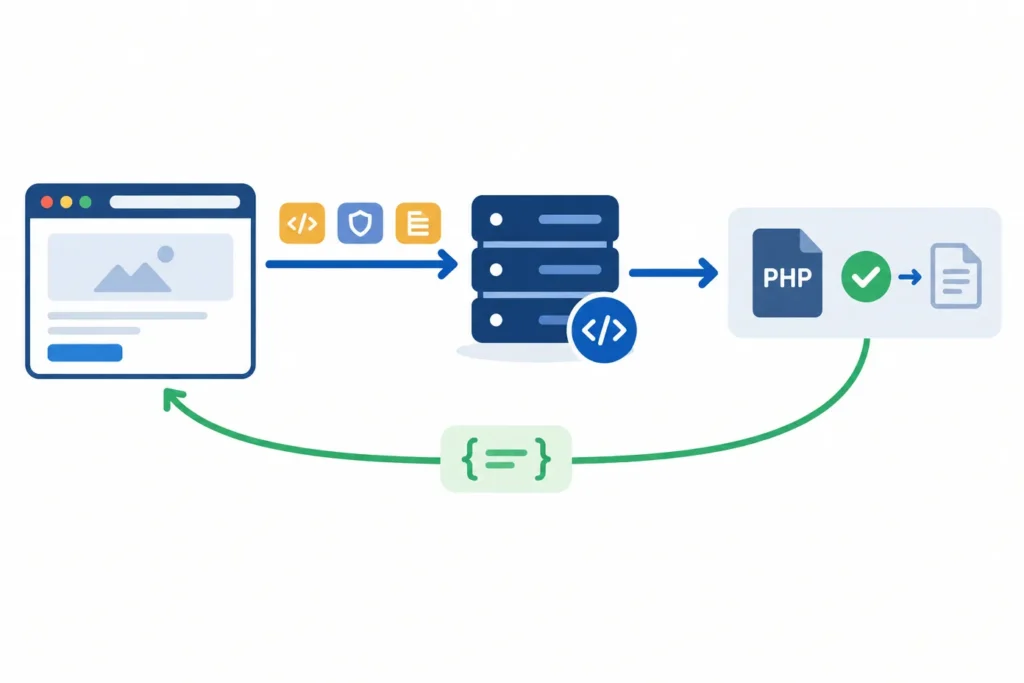
WordPress AJAX lets a page send data to PHP and update part of the interface without a full reload. This guide builds a small post-title lookup feature: a visitor enters a published post ID, JavaScript sends the ID, action, and nonce to admin-ajax.php, and WordPress returns a JSON success or error response.
The important part is the complete request path, not an isolated snippet. You will create a compact plugin, enqueue its browser script, pass configuration without hardcoding a site URL, register public and logged-in actions, validate the request, and inspect failures when the response is not what you expect.
WordPress AJAX at a Glance
An AJAX request has four connected pieces:
- A browser event, such as a form submission, starts JavaScript.
- JavaScript sends a request to WordPress’s
admin-ajax.phpendpoint. - The request includes an
actionvalue. WordPress uses it to find the matching PHP hook and callback. - The callback validates and processes the input, then sends a JSON response that JavaScript displays.
For the example below, the browser submits action=webomnizz_post_lookup, a nonce, and a post ID. PHP checks the nonce, verifies that the ID refers to a published post, and returns either:
{
  "success": true,
  "data": {
    "message": "Found: Example post title"
  }
}
or:
{
  "success": false,
  "data": {
    "message": "Enter a valid published post ID."
  }
}
admin-ajax.php is a WordPress request router for action-based AJAX callbacks. It is not a JavaScript library and does not make a feature secure by itself. The callback remains responsible for validation, authorization where needed, and limiting what it returns. Before publishing a production implementation, review its behavior against the WordPress and PHP versions in your environment, along with your script-loading setup.
What You Need Before Starting
Use a local, development, or staging WordPress installation rather than editing a production site directly. You need access to create a small plugin, plus a browser with developer tools. This example uses two files:
wp-ajax-post-lookup.phpfor hooks, script enqueueing, the shortcode, and the PHP callback.assets/post-lookup.jsfor the browser-side request and UI updates.
The shortcode supplies the feature markup. A visitor submits the form, the script prevents the normal page submission, and it posts data to WordPress. WordPress loads the callback identified by the action name and sends JSON back to the same script.
Frontend requests need special handling because WordPress does not automatically create a global ajaxurl variable on ordinary public pages. Dashboard screens commonly have it available, but frontend code should receive the endpoint explicitly when the script is enqueued. A nonce can also be passed at that point.
This is intentionally a read-only public lookup. It only reveals the title of an already published post, so it does not need a capability check. If a request creates, edits, deletes, publishes, exports, or reveals protected data, verify an appropriate capability in PHP before doing that work. A nonce confirms request intent; it is not permission checking.
Enqueue JavaScript and Pass Configuration
Load the script through WordPress instead of placing a hardcoded script tag in a template. Enqueueing gives WordPress control of dependency order and avoids embedding a site-specific endpoint in a static JavaScript file.
In the plugin below, wp_enqueue_script() registers and places the file in the footer. wp_localize_script() then makes an object named postLookup available before that script runs. Despite its name, this function is often used to pass small configuration values to a script.
The values are generated by the running site:
ajaxUrlis the correct URL foradmin-ajax.php.nonceis tied to this feature’s request action.
Keep object and action names specific enough to avoid collisions with another plugin or theme. If your script depends on another registered script, add its handle in the dependency array. This example has no JavaScript dependency.
Build the Browser-Side AJAX Request
The browser code uses fetch() and sends URL-encoded form data. That format is a simple fit for admin-ajax.php, which places submitted values in PHP’s $_POST array. It also disables the button while the request is pending, so an impatient double-click does not create duplicate requests.
Do not assume every server response is valid JSON. A fatal PHP error, a security product, an accidental echo, or an HTML error page can produce a non-JSON response. The example reads text first, then attempts to parse it. It gives the visitor a useful generic message while preserving the unexpected response in the browser console for development.
Register and Implement the PHP Handler
WordPress maps an AJAX action to hooks with a fixed naming pattern:
wp_ajax_{action}handles authenticated requests.wp_ajax_nopriv_{action}handles visitors who are not logged in.
Register both only when the feature is intended for both audiences. The post lookup is public, so it uses both. An account-only feature should normally register only the authenticated hook, then enforce its capability requirements in the callback.
The handler uses check_ajax_referer() to verify the nonce sent in the nonce field. It reads the expected numeric input with absint(), checks that a post exists and is published, then returns with wp_send_json_success() or wp_send_json_error(). Those functions emit JSON and end execution, so do not add an extra wp_die() after them.
Sanitizing is not the same as validating. Sanitization transforms input into a safe representation; validation confirms that the resulting value makes sense for the operation. For a post ID, converting to a positive integer is useful sanitization, but checking the post’s status is still necessary validation.
Complete Working Example
Create this directory structure inside wp-content/plugins:
wp-ajax-post-lookup/
├── wp-ajax-post-lookup.php
└── assets/
    └── post-lookup.js
Place the following code in wp-ajax-post-lookup.php. Activate the plugin in the WordPress admin area, then add [webomnizz_post_lookup] to a page or post.
<?php
/**
 * Plugin Name: WP AJAX Post Lookup
 * Description: A small admin-ajax.php example.
 * Version: 1.0.0
 */

defined( 'ABSPATH' ) || exit;

function webomnizz_enqueue_post_lookup_script() {
    $script_handle = 'webomnizz-post-lookup';

    wp_enqueue_script(
        $script_handle,
        plugin_dir_url( __FILE__ ) . 'assets/post-lookup.js',
        array(),
        '1.0.0',
        true
    );

    wp_localize_script(
        $script_handle,
        'postLookup',
        array(
            'ajaxUrl' => admin_url( 'admin-ajax.php' ),
            'nonce'   => wp_create_nonce( 'webomnizz_post_lookup' ),
        )
    );
}
add_action( 'wp_enqueue_scripts', 'webomnizz_enqueue_post_lookup_script' );

function webomnizz_post_lookup_shortcode() {
    ob_start();
    ?>
    <form class="webomnizz-post-lookup">
        <label for="webomnizz-post-id">Published post ID</label>
        <input id="webomnizz-post-id" name="post_id" type="number" min="1" required>
        <button type="submit">Find post</button>
        <p class="webomnizz-post-lookup-result" aria-live="polite"></p>
    </form>
    <?php
    return ob_get_clean();
}
add_shortcode( 'webomnizz_post_lookup', 'webomnizz_post_lookup_shortcode' );

function webomnizz_handle_post_lookup() {
    check_ajax_referer( 'webomnizz_post_lookup', 'nonce' );

    $post_id = isset( $_POST['post_id'] ) ? absint( $_POST['post_id'] ) : 0;
    $post    = $post_id ? get_post( $post_id ) : null;

    if ( ! $post || 'publish' !== $post->post_status ) {
        wp_send_json_error(
            array( 'message' => 'Enter a valid published post ID.' ),
            400
        );
    }

    wp_send_json_success(
        array(
            'message' => sprintf( 'Found: %s', get_the_title( $post ) ),
        )
    );
}
add_action( 'wp_ajax_webomnizz_post_lookup', 'webomnizz_handle_post_lookup' );
add_action( 'wp_ajax_nopriv_webomnizz_post_lookup', 'webomnizz_handle_post_lookup' );
Now create assets/post-lookup.js:
document.addEventListener('DOMContentLoaded', () => {
  const form = document.querySelector('.webomnizz-post-lookup');

  if (!form || typeof postLookup === 'undefined') {
    return;
  }

  const input = form.querySelector('[name="post_id"]');
  const button = form.querySelector('button[type="submit"]');
  const result = form.querySelector('.webomnizz-post-lookup-result');

  form.addEventListener('submit', async (event) => {
    event.preventDefault();

    const postId = input.value.trim();
    if (!postId) {
      result.textContent = 'Enter a post ID first.';
      return;
    }

    button.disabled = true;
    result.textContent = 'Looking up the post…';

    const body = new URLSearchParams({
      action: 'webomnizz_post_lookup',
      nonce: postLookup.nonce,
      post_id: postId,
    });

    try {
      const response = await fetch(postLookup.ajaxUrl, {
        method: 'POST',
        headers: {
          'Content-Type': 'application/x-www-form-urlencoded; charset=UTF-8',
        },
        body: body.toString(),
      });

      const text = await response.text();
      let payload;

      try {
        payload = JSON.parse(text);
      } catch (error) {
        console.error('Unexpected AJAX response:', text);
        throw new Error('The server did not return valid JSON.');
      }

      if (!response.ok || !payload.success) {
        throw new Error(payload.data?.message || 'The lookup failed.');
      }

      result.textContent = payload.data.message;
    } catch (error) {
      result.textContent = error.message || 'Unable to complete the lookup.';
    } finally {
      button.disabled = false;
    }
  });
});
This is plugin-oriented because the plugin owns the shortcode, assets, and callback in one portable unit. A theme can use the same hooks and callback logic in its functions.php file, but a feature that is meant to survive a theme change is usually better placed in a plugin.
To verify it, open the page containing the shortcode, enter the ID of a published post, and submit the form. In browser developer tools, open the Network panel and confirm a POST request reaches admin-ajax.php. Its request payload should include action, nonce, and post_id; its response should be JSON with success and data.
Debugging and Common WordPress AJAX Errors
Start in the browser Network panel rather than guessing. Select the request and inspect its URL, payload, status code, and response body.
The response is0This commonly means WordPress could not find a callback for the supplied action. Check that JavaScript sends the exact action string and that the correspondingwp_ajax_orwp_ajax_nopriv_hook is registered on every request.The response is -1 or a nonce errorCheck the nonce action string and field name. They must match the values used bywp_create_nonce()andcheck_ajax_referer(). Cached public pages can also serve an old nonce; account for caching when designing a long-lived interface.The response is blank or malformedInspect the raw response, not just JavaScript’s parsing error. Unexpected output before JSON, PHP warnings, a fatal error, or another plugin outputting markup can corrupt the response. Avoid debugging output in production callbacks.The request never appearsLook for a JavaScript error before the fetch call, a wrong selector, or a script that was never enqueued. View page source or the Elements panel to confirm the script is present, and confirm the localized object exists.The request gets an HTTP errorRead its response body and server logs. A security layer, server rule, authentication redirect, or PHP failure may be stopping the request before the callback completes.On the WordPress side, log only the information needed to diagnose the problem, and do not log nonces, credentials, personal data, or full sensitive payloads. For example, a temporary log of whether a callback was reached can distinguish routing trouble from input-validation trouble. Remove temporary logging once you have diagnosed the issue.
If the AJAX request is part of a WooCommerce integration rather than an on-page lookup, the failure may be elsewhere in the request chain. See WooCommerce Webhooks Not Working? 10 Things to Check for related troubleshooting steps.
admin-ajax.php Versus the WordPress REST API
Use admin-ajax.php when you are adding a tightly integrated, action-oriented WordPress interaction, especially in an existing plugin or theme that already uses this pattern. It is also a reasonable choice for small forms and legacy code where adding a REST route would not make the design clearer.
Use a REST endpoint when your application exposes resource-oriented data, needs consistent routes and HTTP methods, or will be consumed by a separate client such as a mobile app, JavaScript application, or external integration. REST routes are generally easier to organize around resources and can make an API boundary more explicit.
The security model is context-dependent in both approaches. A logged-in browser REST request commonly uses a REST nonce, while external clients may need another authentication method. Do not copy an admin-ajax.php nonce pattern into REST code without understanding the route’s permission requirements. For the next step, read WordPress REST API Authentication Explained With Practical Examples.
Security, Performance, and Maintenance Checklist
- Use a specific nonce: verify request intent, but never treat a valid nonce as authorization.
- Authorize sensitive work: use capability checks such as
current_user_can()before changes or protected reads. - Sanitize and validate by type: use an integer parser for IDs, appropriate sanitization for text, and stricter validation for allowed values.
- Return minimal data: expose only fields the browser needs and avoid raw internal error details.
- Reduce needless requests: require input before submission, disable duplicate clicks, paginate broad queries, and cache only where the data and security model allow it.
- Keep names maintainable: prefix hooks, action values, script handles, shortcode names, and localized object names.
- Record the environment: during review, note the WordPress, PHP, theme, plugin, and relevant browser requirements so future maintenance has a baseline.
- Test both audiences: if you register
nopriv, test in a logged-out browser as well as while logged in.
Bookmark this guide when you need to trace a browser-to-PHP request. Once the basic flow is working, choose between keeping the interaction in admin-ajax.php or designing a REST route based on the client, data model, and authentication needs.