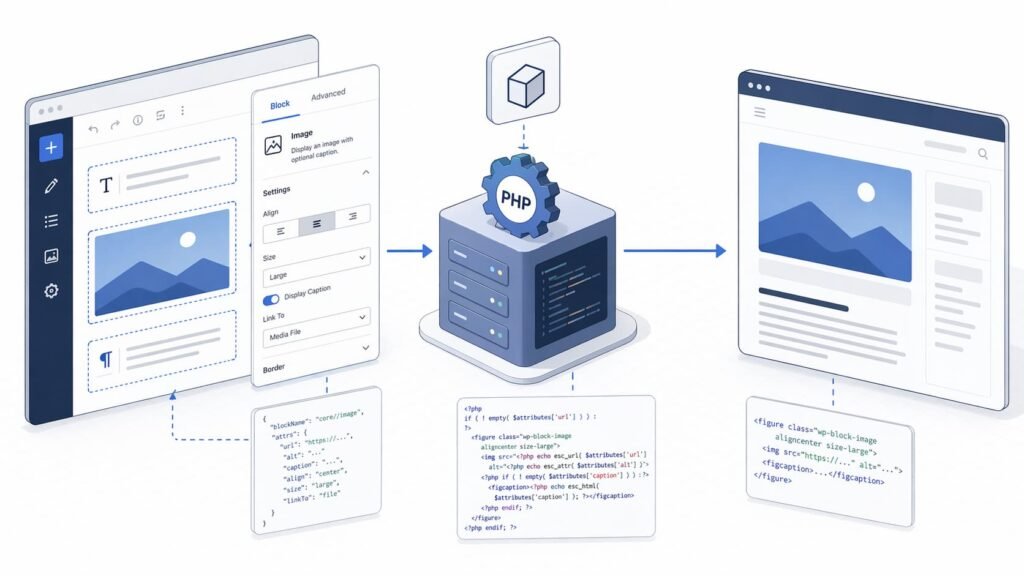
If you’re building Gutenberg blocks in 2026, server-side rendering (SSR) is still the right choice for blocks that depend on live server data, user context, or PHP-heavy logic.
But there’s one distinction many teams miss:
- Frontend SSR for dynamic blocks is a core pattern.
- Editor SSR via
@wordpress/server-side-renderis treated as a fallback/legacy mechanism in current WordPress docs, not the default architecture for new features.
That distinction will save you from slow editor UX and hard-to-maintain block code.
Quick Answer: What SSR Means in Gutenberg
In Gutenberg, SSR usually means your block output is generated in PHP at request time rather than stored as fixed HTML in post content.
Practically, that means:
- Your block is registered as dynamic.
- The front end is rendered through
render_callbackor arendertemplate file inblock.json. - The editor stores attributes, while runtime markup is generated on render.
When to Use Server-Side Rendering in Gutenberg
Use dynamic server-side rendering when:
- Content changes without re-editing the post (latest posts, inventory, personalized data).
- Markup should update globally after code changes.
- Output depends on server-only context (permissions, options, external APIs, PHP transforms).
- You need reliable escaping and policy checks in PHP.
Avoid SSR when the block is purely presentational and stable. Static blocks are simpler and usually faster to render at scale.
Static vs Dynamic Blocks (And Why It Matters)
Static blocks save HTML in the database during editing. Dynamic blocks generate output at runtime.
For dynamic blocks, WordPress docs note that save often returns null, so only attributes are stored and markup is produced server-side. That avoids validation issues when markup evolves over time.
Tradeoff summary:
- Static blocks: simpler pipeline, low runtime cost, harder to roll out markup changes globally.
- Dynamic blocks: flexible runtime output, easier global updates, higher request-time work.
Core Implementation Pattern (2026)
Register from block.json
Use metadata-based registration so block config stays consistent across editor and server.
block.json can include a render property (introduced in WordPress 6.1) pointing to a PHP template file.
Use render.php or render_callback
Either pattern is valid:
renderinblock.jsonfor file-based rendering.render_callbackin registration for function-based rendering.
Keep output escaped (esc_html, esc_url, wp_kses_post) and treat attributes as untrusted input.
Keep editor rendering lightweight
@wordpress/server-side-render can preview dynamic output in the editor, but current docs explicitly frame it as a fallback/legacy approach and recommend client-side rendering in edit where possible.
Use it when you truly need parity with complex legacy PHP output, not as your default block UI strategy.
Example: Minimal Dynamic Block
block.json:
{
  "$schema": "https://schemas.wp.org/trunk/block.json",
  "apiVersion": 3,
  "name": "acme/recent-post-title",
  "title": "Recent Post Title",
  "category": "widgets",
  "attributes": {
    "label": {
      "type": "string",
      "default": "Latest post"
    }
  },
  "editorScript": "file:./index.js",
  "render": "file:./render.php"
}render.php:
<?php
$recent_posts = wp_get_recent_posts(
  array(
    'numberposts' => 1,
    'post_status' => 'publish',
  )
);

if ( empty( $recent_posts ) ) {
  return '<p>No posts found.</p>';
}

$post_id = $recent_posts[0]['ID'];
$label   = isset( $attributes['label'] ) ? $attributes['label'] : 'Latest post';

return sprintf(
  '<p class="acme-recent-post"><strong>%1$s:</strong> <a href="%2$s">%3$s</a></p>',
  esc_html( $label ),
  esc_url( get_permalink( $post_id ) ),
  esc_html( get_the_title( $post_id ) )
);
This pattern gives you runtime freshness and centralized PHP control without overloading editor-side SSR.
Performance, Caching, and Security
For production sites, SSR quality is mostly about operational discipline:
- Cache expensive queries inside render callbacks.
- Keep DB calls minimal per block instance.
- Escape all output and validate all attributes.
- Avoid remote API calls on every render unless cached.
- Test block-heavy pages under realistic concurrency.
If your block appears dozens of times per page, caching strategy matters more than block syntax.
Common Mistakes
- Using
ServerSideRenderfor every block edit UI
This creates slow editor experiences and unnecessary API chatter. - Mixing static and dynamic intent in one block without a plan
Choose one rendering contract and document it clearly. - No fallback strategy when plugin is disabled
If relevant, preserve safe saved content or degrade gracefully. - Skipping attribute validation/escaping
Dynamic rendering increases security responsibility on the server.
Final Decision Framework
Ask these three questions:
- Does output depend on live server data or user context?
- Will markup need global updates without re-saving posts?
- Is PHP rendering logic materially easier/safer than client rendering?
If mostly yes, build a dynamic block with frontend SSR.
If mostly no, prefer a static block and keep runtime lighter.
FAQ
@wordpress/server-side-render still recommended for new blocks?WordPress docs position it as a fallback/legacy mechanism for editor previews. For new features, client-side editor rendering with REST-backed data is generally preferred.
save return null for dynamic blocks?Often yes. That’s the common pattern when markup is generated server-side from attributes.
block.json render better than manual render_callback?Neither is universally “better.” render in metadata is clean and discoverable; render_callback can be better when you need centralized function wiring.
The server-side preview path uses /wp/v2/block-renderer/:block, which calls the block’s render callback.