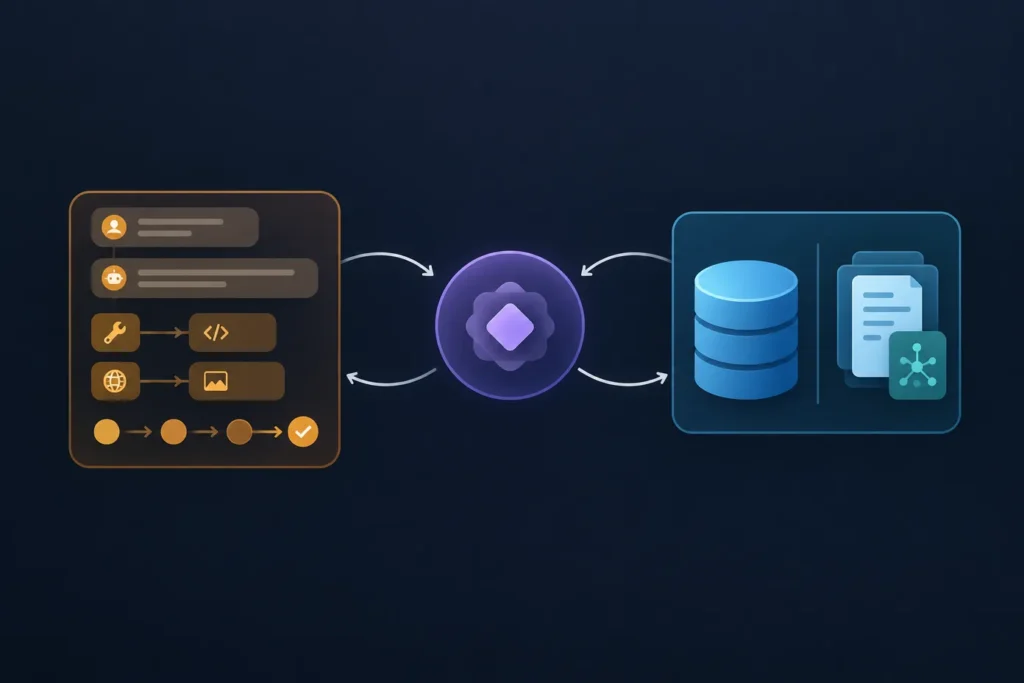
AI agent memory is the information an agent can use while completing a task or during a later interaction. The simplest agent may only need the current prompt and recent tool output. A support assistant or SaaS feature may also need to recall a user’s preferences, account records, past decisions, or relevant documentation without loading everything it has ever seen.
The practical distinction is straightforward: short-term memory supports the active run, while long-term memory persists and must be retrieved deliberately. Most reliable systems use both, but only after defining what is worth remembering, who may access it, how long it remains stored, and how incorrect information can be fixed or removed.
What AI Agent Memory Means
In an AI agent, memory is information available to the agent beyond the wording of its latest user message. That information can help it continue a conversation, choose a tool, avoid repeating work, or tailor a response.
Memory is not the same thing as a model permanently learning every interaction. A language model processes the input it receives for a request. Unless an application stores information and supplies it again later, the model has no durable record of a previous session.
It helps to separate four related concepts:
- Model context: the instructions, user input, tool definitions, and other text or data included in the model request.
- Session state: temporary application data for one agent run or conversation, such as the active workflow step, selected item, and recent tool results.
- Structured application data: authoritative records in a database or service, such as an order status, user profile, permissions, or account plan.
- Semantic memory: stored text or documents retrieved because their meaning appears relevant to the current request.
These are often called “memory,” but they solve different problems. A customer’s shipping address belongs in an authoritative record with access controls, not as an unverified sentence in a chat transcript. A troubleshooting note may be a good candidate for semantic retrieval. The current tool-call result usually belongs in session state.
Short-Term vs Long-Term Memory Compared
Use short-term memory to keep an active task coherent. Use long-term memory only when continuity across sessions produces clear value. This comparison provides a quick starting point.
| Question | Short-term memory | Long-term memory |
|---|---|---|
| Lifespan | One request, run, or session | Across sessions until deleted or expired |
| Typical contents | Recent messages, task state, tool outputs | Preferences, validated facts, prior outcomes, reusable knowledge |
| Common location | Request context, cache, workflow state | Database, document store, vector store, or profile service |
| How it is used | Usually included directly in the next model call | Filtered and retrieved when relevant |
| Maintenance | Trim, summarize, or expire | Correct, deduplicate, secure, expire, and audit |
| Best fit | Focused, temporary work | Personalization and cross-session continuity |
Short-term context is usually easier because its value ends soon. Persistent memory introduces ownership, consent, retrieval quality, stale data, and security concerns. Do not add a vector database just because an agent has a conversation history.
- Choose session-only memory for a one-off document analysis, a form-filling workflow, or an isolated support chat.
- Choose structured long-term records when the agent needs exact account, inventory, permission, or workflow data.
- Choose semantic retrieval when useful information is mostly unstructured and the agent needs to find relevant passages among many notes or documents.
- Choose a hybrid design when the agent must understand the current conversation and draw on carefully scoped history.
Short-Term Memory: Context for the Current Task
Short-term memory is the working area for the current interaction. It commonly contains recent conversation turns, intermediate plans, selected variables, tool responses, errors, and the current workflow position.
For example, an agent handling “Find my latest invoice and explain the charge” may keep the authenticated user ID, the chosen invoice, a billing API response, and the last few messages in state. That allows the agent to make the next tool call and explain the result without asking the user to repeat the request.
Conversation history is one kind of short-term memory, but it is not the whole system. A reliable agent also needs explicit state. Instead of hoping the model infers that a record was selected, store something like:
{
  "session_id": "sess_123",
  "user_id": "user_456",
  "task": "explain_invoice_charge",
  "selected_invoice_id": "inv_789",
  "completed_steps": ["authenticate", "fetch_invoice"],
  "recent_tool_result": {"currency": "USD", "status": "paid"}
}
Context windows are finite. As a session grows, an application may drop older turns, retain only the most relevant messages, or replace a completed section with a concise summary. A summary reduces context size, but it is lossy: it can omit a constraint or preserve an earlier mistake. Keep exact structured fields for details the workflow cannot safely lose.
Session-only memory is often sufficient when an agent completes a bounded workflow, has no reason to personalize later responses, or works with data that should not persist. Expire it promptly when the task ends.
Long-Term Memory: Information That Persists
Long-term memory is information stored outside the current request so it can be used in a future session. Useful candidates include explicit user preferences, validated profile facts, approved workflow outcomes, durable project decisions, and reusable internal knowledge.
Persistence alone does not make data useful. The application needs a way to find the right record, judge whether it is still valid, and ensure the agent is allowed to use it. Long-term memory should be selective rather than a raw archive of every generated response.
Structured records and semantic memories
Structured memory works best when exact fields matter. A profile table might contain a user’s preferred language, notification setting, or explicitly selected tone. An application database should remain the source of truth for facts such as subscription status or order details.
{
  "user_id": "user_456",
  "preference": "response_style",
  "value": "concise",
  "source": "user_setting",
  "updated_at": "2025-01-15T10:30:00Z",
  "expires_at": null
}
Semantic memory is useful when the question is “Which previous note is relevant?” rather than “What is the exact value of this field?” An application can store a document or note alongside a numerical representation used for similarity search. At request time, it retrieves a small set of relevant passages and places them in the model context.
A vector database can help with this semantic retrieval pattern, especially for a larger collection of notes, knowledge-base content, or past outcomes where keywords alone are weak. It is not a replacement for a transactional database, permission checks, or filters. A vector match may be relevant in language while belonging to the wrong user or tenant.
Common AI Agent Memory Architectures
Conversation buffer
A conversation buffer sends recent messages to the model on each turn. It is simple and useful for short chats, but its size grows over time. Set a maximum size, decide what happens when the limit is reached, and avoid treating it as permanent truth.
Summarized session memory
When a conversation becomes long, the application keeps recent messages plus a summary of earlier activity. This reduces repeated context while preserving the broad objective, decisions, and open tasks. Keep the original records elsewhere if traceability matters, and validate summaries before using them for consequential actions.
Structured profiles and application state
Profiles, relational tables, key-value stores, and workflow state are often the simplest persistent approach. They offer predictable fields, direct lookups, validation, and easier corrections. For many first agents, this is more appropriate than semantic search.
Semantic retrieval
Semantic retrieval stores chunks of useful text with metadata. A request is used to retrieve candidate chunks, then the application filters and ranks them before passing only a limited set to the model. Typical metadata includes tenant ID, user ID, source type, created date, document version, access level, confidence, and expiry date.
Hybrid memory
A hybrid design combines recent conversation context, explicit workflow state, authoritative structured records, and a small set of retrieved passages. This is a common architecture because each layer has a distinct job. Framework behavior and API details change, so verify the current documentation for any agent framework, AI API, database, or vector store before implementing a specific integration.
How Memory Fits Into an Agent Workflow
A useful model is read, process, write. Memory should be part of an explicit application flow, not an invisible side effect of every model response.
- Read: identify the user and tenant, load permitted profile fields and task state, then retrieve only potentially relevant long-term memories.
- Process: provide the selected context, instructions, and tool results to the model. The agent decides what action or answer is needed.
- Verify: validate tool outputs and proposed facts against authoritative sources where possible.
- Write: save only durable, useful outcomes that meet a defined rule. Attach source and lifecycle metadata.
Consider a workflow automation agent that receives a support request. It reads the ticket and the tenant ID, loads the customer’s approved preferences, fetches the live account state through an API, and searches only tenant-scoped troubleshooting notes. After resolution, it may write a short validated outcome such as “billing address corrected on request” with a timestamp and source. It should not automatically store the model’s speculative diagnosis as fact.
APIs and databases provide authoritative data. Workflow tools coordinate triggers, branches, retries, and actions. Agent frameworks can manage prompts, tool calls, state transitions, and retrieval steps. The implementation may vary, but keeping read and write boundaries explicit makes the system easier to test and debug.
Design Decisions, Privacy, and Failure Modes
Memory can make an agent more helpful, but it can also preserve the wrong thing. Treat a generated statement as untrusted until it is verified or explicitly confirmed by a user under a defined policy.
Define a write policy
Specify what may be written, who or what can approve it, and how long it should remain. A basic policy could allow explicit preferences and verified workflow outcomes, while rejecting secrets, payment data, one-time authentication codes, private credentials, and unsupported inferences about a person.
Do not store every message by default. Raw chat logs can contain accidental sensitive disclosures, stale instructions, irrelevant text, and prompt-injection content. If conversations are retained for an approved purpose, apply access controls and a documented deletion process.
Scope access before retrieval
Every read should be constrained by tenant and user boundaries before semantic similarity is considered. In practice, retrieval filters may include tenant_id, user_id, access_level, memory_type, and an expiration condition. Never rely on the model alone to decide whether a retrieved record is authorized.
Handle stale and conflicting records
Long-term memories can be duplicated, contradicted, or no longer true. Record the source, timestamp, confidence or verification state, and expiry. Prefer fresh authoritative records over an old generated summary. Give users and operators a way to view, correct, or delete stored preferences and facts when the product requires it.
Log what was retrieved, what was written, the policy decision, and the source identifiers. Avoid logging sensitive contents unnecessarily. These records help diagnose why an agent made an unexpected decision without turning observability into another uncontrolled data store.
When to Use Short-Term, Long-Term, or Both
Start with the smallest memory system that meets the requirement.
- One-off task: A document extraction agent needs the uploaded file, current instructions, and temporary task state. Use short-term memory and delete it according to the task’s lifecycle.
- Support assistant: It needs the current ticket, live account data, and perhaps an explicit communication preference. Use short-term session state plus structured persistent records. Add semantic retrieval for a large approved knowledge base, not for account truth.
- Workflow automation: A multi-step process needs run IDs, idempotency keys, completed actions, and retry state. Use durable structured state so a failed run can be resumed safely. Semantic memory is usually optional.
- SaaS assistant: It may need current chat context, user settings, tenant-scoped product documentation, and approved project decisions. A hybrid design is appropriate if each layer has clear rules.
The simplest first architecture is often a bounded recent-message buffer plus a small, validated user profile in a normal database. Add summarized context when sessions become long. Add semantic retrieval only when readers or users genuinely need the agent to locate relevant unstructured material.
Implementation Checklist and Next Steps
- Write down each fact the agent must remember, why it is needed, and its retention period.
- Classify it as request context, session state, authoritative structured data, or retrievable unstructured knowledge.
- Define a schema with owner or tenant identifiers, source, timestamps, verification state, and deletion or expiry rules.
- Set retrieval filters before ranking results, especially for tenant and user isolation.
- Create explicit write triggers. For example, save an explicit preference only after confirmation, or save a workflow outcome only after the underlying action succeeds.
- Test no-memory, relevant-memory, missing-memory, stale-memory, duplicate-memory, conflicting-memory, and unauthorized-memory cases.
- Log retrieval and write decisions, then review failures to improve the schema or policy rather than blindly retaining more data.
Memory is most effective when it is intentional: current context for the work in progress, durable records for exact facts, and retrieval for relevant unstructured knowledge. Bookmark this reference when designing an agent, then continue with a practical guide on AI automation architecture, agent state, API integrations, persistent databases, or workflow orchestration.